Embedded Form Dynamic Shipping
Dynamic shipping shows address-based shipping rates in Stripe checkout. The customer enters a shipping address in the embedded form, and Chord OMS recalculates the available shipping options for that address.
Dynamic shipping runs only in Embedded form mode and requires @stripe/stripe-js v9+.
Configure in Chord OMS
All three settings below live on one page in Chord OMS: Settings → Integrations → Stripe Checkout.
This page controls how the embedded checkout is built, from which fields it collects to whether it recalculates shipping after the customer enters an address.
Set them in order:
- Checkout Experience → Embedded form. This switches the checkout session to the form-based experience, which is what allows shipping options to be recalculated after the customer enters an address.
- Embedded Form Fields → enable Shipping address. This adds an address field to the embedded form so Chord OMS can capture it. This is required. The Dynamic shipping options toggle is disabled until this is on.
- Shipping Options → enable Dynamic shipping options. With this on, the OMS recalculates shipping rates against the address the customer just entered, instead of showing a static rate list.
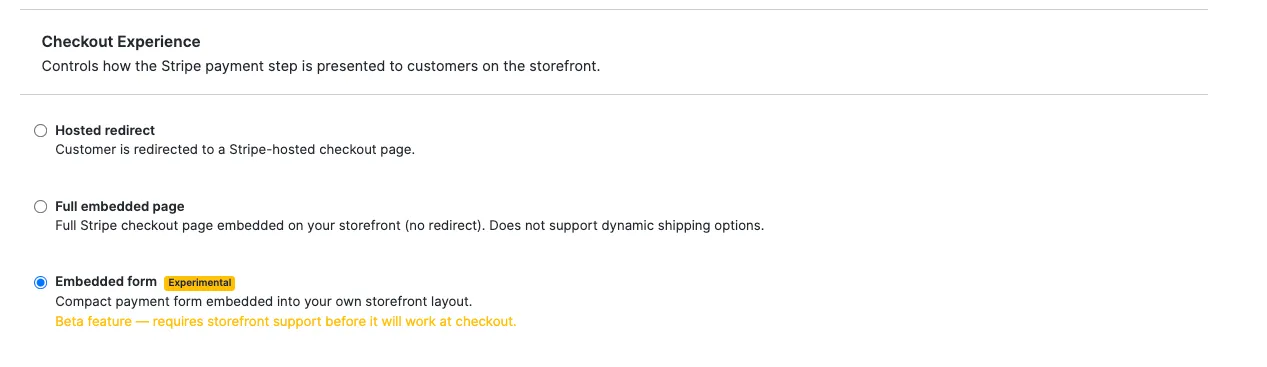
Also set Store Settings → STRIPE_ALLOWED_COUNTRIES, which controls which countries the address field will accept, and configure shipping zones and methods for each of those countries. Provide a country-wide default zone so addresses that don't match a more specific zone still return valid rates. Without one, checkout can dead-end for those customers.
That's all the configuration. The storefront reads these settings from the order API. There's no storefront env flag or redeploy needed to change modes. Flipping a setting in Chord OMS takes effect on the next checkout session.
Storefront
- Chord NextJS Starter: No changes needed. It reads the fields above and mounts the right flow automatically.
- Custom storefront: Branch on checkout_ui_mode and, in form mode, recalculate when dynamic_shipping_options is on.
import { loadStripe } from '@stripe/stripe-js' // v9+
import { useCheckout } from '@chordcommerce/react-autonomy'

const stripePromise = loadStripe(process.env.STRIPE_PK_KEY, {
  stripeAccount: process.env.STRIPE_CONNECTED_ACCOUNT,
})

async function startCheckout(cart) {
  // cart = order returned by prepareCheckout()
  if (cart.checkoutUiMode === 'hosted') {
    window.location.href = cart.checkoutUrl
    return
  }

  const stripe = await stripePromise

  if (cart.checkoutUiMode === 'embedded') {
    const checkout = await stripe.createEmbeddedCheckoutPage({ clientSecret: cart.clientSecret })
    checkout.mount('#checkout')
    return
  }

  // Embedded form (dynamic shipping)
  const checkout = await stripe.initCheckoutFormSdk({ clientSecret: cart.clientSecret })
  const form = checkout.createForm()
  form.mount('#checkout')

  if (cart.dynamicShippingOptions && !cart.onlyVirtualItems) {
    let lastKey = null
    let updating = false

    form.on('change', async ({ value, status }) => {
      if (updating || !status.shippingAddress?.complete) return

      const a = value.shippingAddress?.address || {}
      const key = JSON.stringify([a.country, a.state, a.city, a.postal_code, a.line1, a.line2])
      if (key === lastKey) return // same destination — skip

      updating = true
      lastKey = key
      try {
        const actions = await checkout.loadActions()
        if (actions.type !== 'success') { lastKey = null; return }
        await actions.actions.runServerUpdate(() =>
          calculateShippingOptions({ number: cart.number, token: cart.token }, value.shippingAddress)
        )
      } catch {
        lastKey = null
      } finally {
        updating = false
      }
    })
  }
}
Requires STRIPE_PK_KEY and STRIPE_CONNECTED_ACCOUNT in the storefront env.
Rendering the order summary (form mode)
In form mode, Stripe renders only the payment form — not the cart. You render the order summary (items, subtotal, shipping, tax, total) yourself, next to the #checkout mount.
The data comes from the order object (useCart() / prepareCheckout()):
Field | Value |
|---|---|
cart.lineItems[] | variant.name, variant.optionsText (e.g. "Pot Size: 6in"), quantity, singleDisplayAmount (unit), displayAmount (line total), variant.images[0] |
cart.displayItemTotal | Subtotal |
cart.displayShipTotal | Shipping — empty until an address is entered |
cart.displayTaxTotal | Tax — empty until an address is entered |
cart.displayTotal | Total due |
lineItem.prePaidSubscription | Prepaid subscription: installmentCount, intervalLength / intervalUnits (e.g. every 6 months), singleInstallmentPrice, lineItems[0].quantity, recurring (renews after prepaid when ≠ none) |
lineItem.subscriptionLineItems | Regular (non-prepaid) subscription line items |
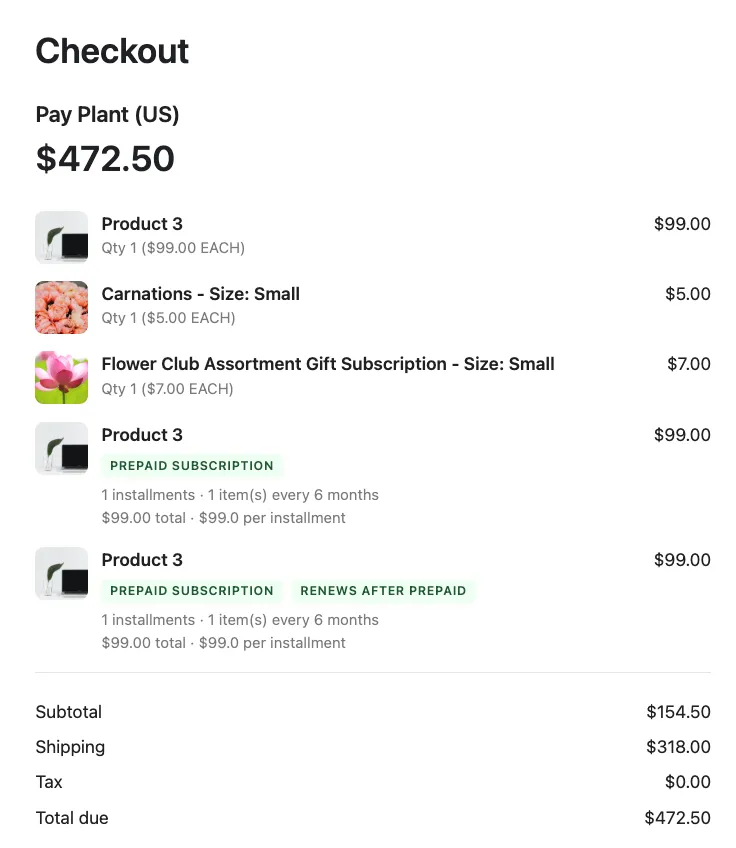
Sample component (adapt styling to your storefront):
function OrderSummary({ cart, storeName, liveTotals }) {
  const { lineItems = [], displayItemTotal } = cart

  // Prefer Stripe's live amounts (see "Keep the totals in sync" below);
  // fall back to the cart values before the form has loaded.
  const shipping = liveTotals?.shipping || cart.displayShipTotal || 'Continue to calculate'
  const tax      = liveTotals?.tax      || cart.displayTaxTotal  || 'Enter address to calculate'
  const total    = liveTotals?.total    || cart.displayTotal

  return (
    <div className="order-summary">
      <h2>Pay {storeName}</h2>
      <p className="order-summary__total">{total}</p>

      {lineItems.map((li) => (
        <div key={li.id} className="order-summary__item">
          {li.variant?.images?.[0] && (
            <img src={li.variant.images[0].smallUrl} alt={li.variant.name} />
          )}
          <div className="order-summary__item-info">
            <span className="order-summary__item-name">
              {li.variant?.name}
              {li.variant?.optionsText ? ` - ${li.variant.optionsText}` : ''}
            </span>
            <LineDetails li={li} />
          </div>
          <span className="order-summary__item-amount">{li.displayAmount}</span>
        </div>
      ))}

      <Row label="Subtotal" value={liveTotals?.subtotal || displayItemTotal} />
      <Row label="Shipping" value={shipping} />
      <Row label="Tax" value={tax} />
      <Row label="Total due" value={total} />
    </div>
  )
}

// Subscription details are extracted from the line item's subscription data.
function LineDetails({ li }) {
  const prepaid = li.prePaidSubscription
  const isSubscription = prepaid || li.subscriptionLineItems?.length > 0

  if (!isSubscription) {
    return (
      <span className="order-summary__item-meta">
        Qty {li.quantity} ({li.singleDisplayAmount} EACH)
      </span>
    )
  }

  const renews = prepaid?.recurring && prepaid.recurring !== 'none'
  const unit = prepaid && (prepaid.intervalLength === 1 ? prepaid.intervalUnits : `${prepaid.intervalUnits}s`)

  return (
    <div className="order-summary__subscription">
      <span className="badge">{prepaid ? 'Prepaid Subscription' : 'Regular Subscription'}</span>
      {renews && <span className="badge">Renews After Prepaid</span>}

      {prepaid && (
        <>
          {/* "1 installments · 1 item(s) every 6 months" */}
          <span>
            {prepaid.installmentCount} installments · {prepaid.lineItems?.[0]?.quantity ?? li.quantity} item(s)
            {' '}every {prepaid.intervalLength} {unit}
          </span>
          {/* "$99.00 total · $99.0 per installment" */}
          <span>{li.displayAmount} total · ${prepaid.singleInstallmentPrice} per installment</span>
        </>
      )}
    </div>
  )
}

function Row({ label, value }) {
  return (
    <div className="order-summary__row">
      <span>{label}</span>
      <span>{value}</span>
    </div>
  )
}
Render it beside the form, passing the live totals (see below):
<div className="checkout-layout">
  <OrderSummary cart={cart} storeName="Plants, Inc." liveTotals={liveTotals} />
  <div id="checkout" />   {/* Stripe mounts the payment form here */}
</div>
Before an address is entered, show the "Continue to calculate" / "Enter address to calculate" placeholders.
Keep the totals in sync with the Stripe form
Important: the customer selects the shipping method and enters the address inside the Stripe form. The cart's displayShipTotal / displayTaxTotal / displayTotal do not reflect those live choices — they stay at the values the session was created with. If you render only the cart values, the summary will show the wrong shipping/tax/total (e.g. Standard $0 while the customer picked Overnight +$90).
Subscribe to the form session's change event and mirror its live breakdown. Stripe fires it with the full recomputed session on every change (shipping method, address, promo), and each amount is a separate field:
const checkout = await stripe.initCheckoutFormSdk({ clientSecret: cart.clientSecret })
const form = checkout.createForm()
form.mount('#checkout')

checkout.on('change', (session) => {
  const t = session?.total
  if (!t) return
  setLiveTotals({
    subtotal: t.subtotal?.amount,     // "$309.00"
    shipping: t.shippingRate?.amount, // "$90.00"
    tax:      t.taxExclusive?.amount, // "$18.00"  (use taxInclusive for inclusive-tax regions)
    total:    t.total?.amount,        // "$244.50"
  })
})
Then render Shipping / Tax / Total from liveTotals when present, falling back to the cart values before the form has loaded:
Because tax, shipping, and total are separate fields on session.total, each line updates independently and correctly (e.g. tax recalculates on its own when the address changes). Subtotal and the line items stay from the cart.
Migrating from an older Stripe version
@stripe/stripe-js v9 removed several functions. If you upgrade to v9 (required for the embedded form), update these call sites:
Old (≤ v8) | New (v9) | Used by |
|---|---|---|
stripe.redirectToCheckout({ sessionId }) | window.location.href = cart.checkoutUrl | Hosted redirect |
stripe.initEmbeddedCheckout(opts) | stripe.createEmbeddedCheckoutPage(opts) | Full embedded page |
— | stripe.initCheckoutFormSdk(opts) | Embedded form (new) |
You do not have to upgrade if you stay on Hosted redirect or Full embedded page (static rates). The older Stripe version keeps working. Upgrade to v9 only to adopt the embedded form or dynamic shipping.
Troubleshooting
- Shipping options don't update on address change. Confirm mode is Embedded form, Shipping address is enabled, and Dynamic shipping options is on. No storefront change is needed.
- initEmbeddedCheckout / redirectToCheckout is not a function. You're on v9. Switch to createEmbeddedCheckoutPage / checkoutUrl (see migration table above).
- "Unable to parse client secret." The storefront flow doesn't match the session's checkout_ui_mode. Branch on checkout_ui_mode as shown above.
- Wrong shipping method shown. The address matched no zone. Add a country-wide default zone.
Reference: which settings control this
Setting (OMS → Stripe Checkout) | Config key | Dynamic shipping |
|---|---|---|
Checkout Experience | STRIPE_CHECKOUT_UI_MODE | form |
Shipping address | STRIPE_SHIPPING_ADDRESS_COLLECTION_ENABLED | enabled |
Dynamic shipping options | STRIPE_DYNAMIC_SHIPPING_OPTIONS | enabled |