Rush Order
Rush Order is a third-party warehouse that picks, packs, and ships your orders. Once it's connected, eligible orders flow to RushOrder automatically. This handbook covers how to set it up, what happens during day-to-day fulfillment, how to handle preorders, and where to look when something doesn't ship.
What you can do with this integration
- Automatic fulfillment — when an order is paid and ready, it's sent to RushOrder for picking and shipping without anyone clicking a button.
- Automatic ship confirmation — once RushOrder enters tracking for an order, the OMS picks it up on its next check and marks the shipment as Shipped, records the tracking number and tracking URL, and triggers the shipping-confirmation email to the customer.
- Browse RushOrder orders inside the OMS — search by order number, OMS number, or ship date and see live status.
- Check warehouse stock — view current inventory in RushOrder by SKU.
- Hold preorders — products with a future release date are held back automatically and released to RushOrder on (or before, if you choose) their release date.
Setting it up
You'll need two pieces of information from RushOrder:
- API Token
- MOM Code (your client identifier at RushOrder)
- Source / Ad Code (optional) — a marketing code attached to each order
- Default Ship Method (optional) — used if a Spree shipping method doesn't have a RushOrder-recognized name
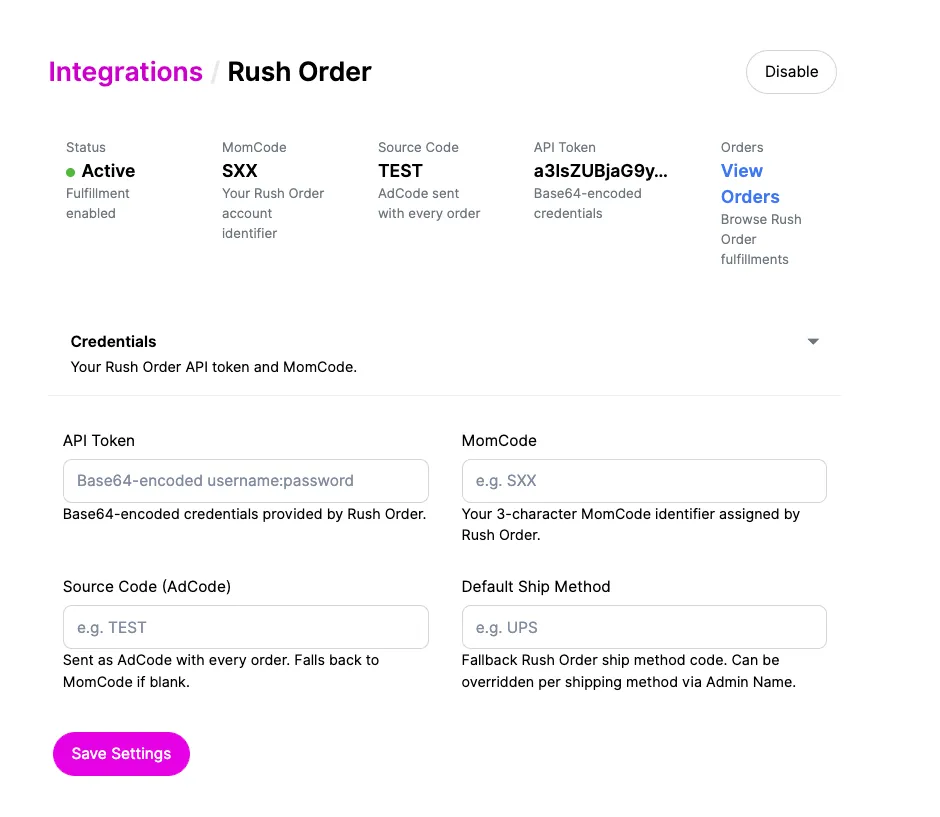
Step 1 — Enter credentials
Go to Settings → Integrations → Rush Order.
- Paste your API Token and MOM Code.
- Optionally add a Source Code and Default Ship Method.
- Click Save.
Step 2 — Enable the integration
After saving, check Enable after save (or click Enable on the integration page).
The Enable button stays disabled until both the API Token and MOM Code are filled in. If you try to enable it without them you'll see "Cannot enable — RushOrder is not fully configured."
Step 3 — Route stock locations to RushOrder
Go to Settings → Stock Locations and on each location that ships from RushOrder, set the Fulfillment Service to Rush Order. Only shipments from those locations will be sent.
Step 4 — Verify
Open Orders → Rush Order → Inventory. If you see your SKUs and stock counts, the connection is working.
Day-to-day fulfillment
When does an order ship?
An order is sent to RushOrder when all of these are true:
- It's paid and approved.
- The shipment is in the Ready state and hasn't already been pushed.
- The shipment's stock location is set to Rush Order.
- The hold-shipment window has passed (default: 60 minutes after checkout — this gives customers time to fix mistakes).
You don't have to do anything — eligible shipments go automatically on a recurring background job.
What gets recorded back?
When RushOrder accepts an order, the OMS stores:
- RushOrder order number — RushOrder's internal ID.
- Reference ID — RushOrder's reference for the shipment.
- Alternate order number — the OMS order number or shipment number; use this to cross-reference back to Chord.
If RushOrder rejects an order, the OMS stores the error message so you can see what went wrong on the order's detail page.
Browsing RushOrder orders
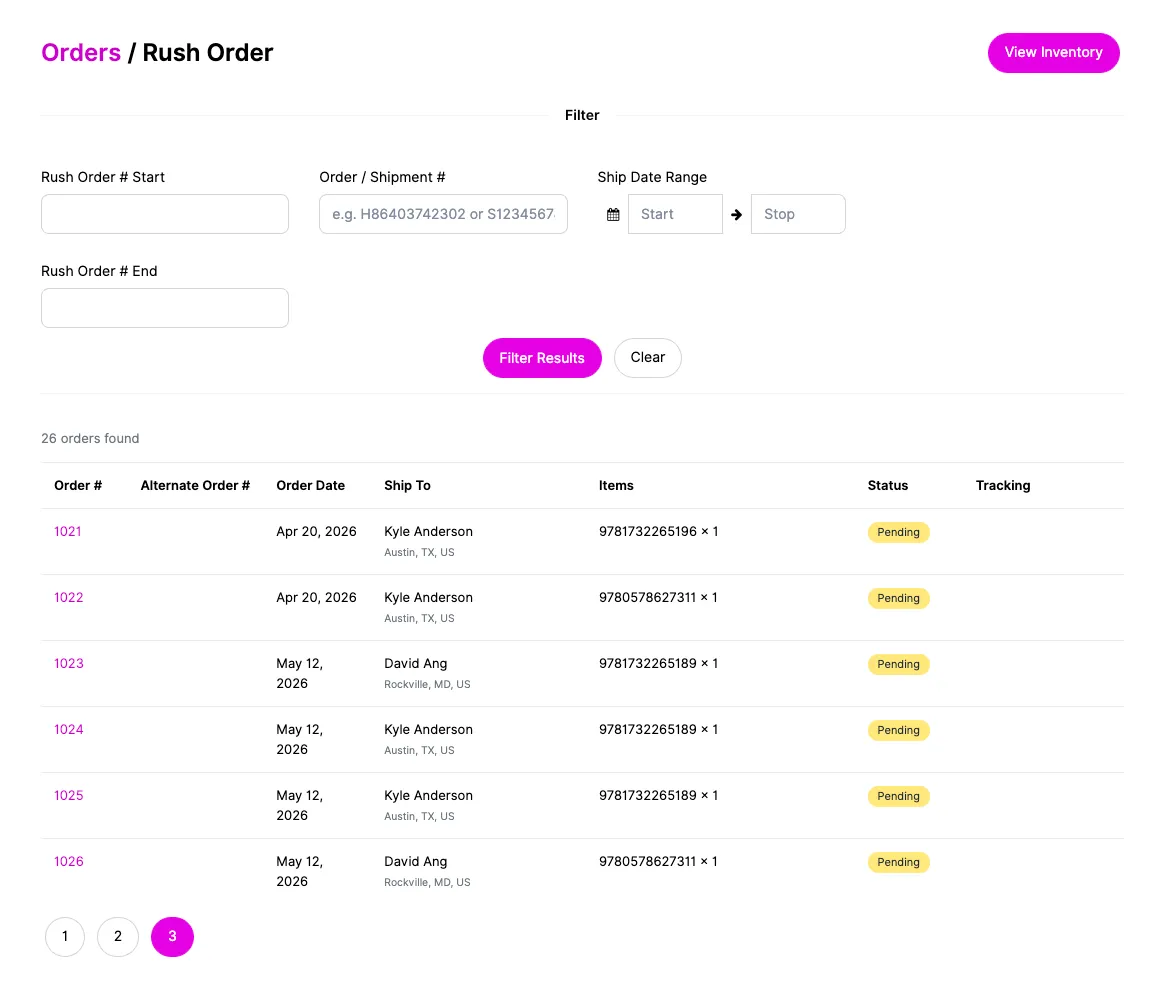
Orders → Rush Order
You'll see a table of orders RushOrder has received. You can filter by:
- Order number range (RushOrder's numbering)
- Ship date range
- OMS number — paste a Chord shipment number or order number and the page will look up the matching RushOrder order(s)
Click any row to see the order detail and current shipment status from RushOrder.
Inventory
Orders → Rush Order → Inventory shows the live SKU stock RushOrder currently holds. Use the SKU filter to narrow the list.
Troubleshooting
"An order is paid but hasn't been sent to RushOrder"
Check in this order:
- Is the shipment ready? Open the order; the shipment must be in the Ready state.
- Right stock location? Confirm the shipment's stock location is routed to Rush Order in Settings → Stock Locations.
- Approved and out of the hold window? Orders are held for the first ~60 minutes after checkout. Check the order's completion time.
- Preorder hold? Open the order — if any line-item product has a future Preorder Release Date, the whole shipment is held until that date. You can force-release it from Orders → Preorders.
If none of the above explains it, contact engineering with the order number.
"RushOrder rejected the order — what now?"
Open the order's detail page and look for the RushOrder error message. The most common causes:
- Unknown ship method. RushOrder only accepts ship method names it knows. Make sure each Spree shipping method's admin name matches what RushOrder expects, or set a Default Ship Method in the integration settings as a fallback.
- Missing/invalid address fields. Country must be set; address fields longer than RushOrder's limits will be truncated automatically, but a missing required field will still fail.
- Bad SKU. The SKU on the line item must exist in RushOrder's catalog. Use the Inventory page to verify.
After fixing the underlying issue, you can re-trigger fulfillment on the order.
"I released a preorder early but it didn't ship"
Releasing only removes the preorder hold. The shipment still has to be Ready, on a RushOrder stock location, and outside the hold window. If those are all true and it still hasn't gone, see the first checklist above.
"RushOrder has shipped the order but the OMS still shows it as Ready"
The OMS checks for shipped orders every 4 hours by default — your shipment may simply not have been picked up yet. To check now:
- Open the order in Orders → Rush Order → [order] and click Refresh status — this asks RushOrder for that specific order.
- If many orders are affected (e.g. recovering from an outage), go to Settings → Integrations → Rush Order and click Run poller now. You can also temporarily bump Lookback (days) to a larger value so older shipments get re-checked.
If RushOrder confirms the order has shipped but the OMS still doesn't mark it Shipped after a manual refresh, contact engineering with the order number.
"I can't enable the integration"
The Enable button is greyed out until both API Token and MOM Code are filled in. Save them first, then enable.
"Inventory page is empty or shows an error"
- Confirm credentials in Settings → Integrations → Rush Order are correct (re-paste them if in doubt).
- Confirm the integration is Enabled.
- If it still fails, RushOrder's API may be having an outage — try again in a few minutes.
FAQ
Does the customer see anything different at checkout? No. RushOrder is invisible to the shopper. They check out normally; fulfillment routing happens after the order is placed.
Can I have some products go to RushOrder and others to a different warehouse? Yes. Routing is per stock location. Products fulfilled from a Rush Order-flagged stock location go to RushOrder; products at other stock locations follow their own integrations.
What if a customer cancels right after checkout? The 60-minute hold-shipment window is designed for exactly this. As long as the cancellation happens before the window closes (or before the shipment is pushed), nothing is sent to RushOrder.
Can I bulk-release every held preorder at once? Yes — use the Send Selected bulk action on the Preorders page. There's no separate "release all" button; this is deliberate, so you have to confirm what you're releasing.
Where do I see whether a shipment has actually left the warehouse? Two places:
- The OMS shipment will be marked Shipped automatically (with tracking number and URL) once RushOrder reports it.
- For the live view, open the order in Orders → Rush Order → [order] — the shipment status section shows RushOrder's current state for that shipment.
How fast does the OMS notice that RushOrder has shipped an order? By default, within 4 hours. You can lower the Poll interval in the integration settings, or click Refresh status on a specific order / Run poller now for the whole store to bypass the schedule.
The customer says they didn't get a shipping confirmation email. Confirmation emails are triggered when the OMS marks the shipment Shipped. If the OMS hasn't picked up RushOrder's tracking yet, the email won't have gone. Use Refresh status on the order to force the check.
Who to contact
- RushOrder credential issues / API outage — your RushOrder account manager.
- Anything else (release dates not honored, shipments not flowing, error messages you don't recognize) — Chord engineering, with the OMS order number.