Warehouse SKU suffixes
Some catalogs carry the same product under different SKUs at different warehouses — for example the "-G" copy lives in one facility and the plain copy in another. RushOrder needs to receive the exact SKU that matches the warehouse it's shipping from, so the OMS can add a warehouse suffix to every SKU it sends.
How it works
Each stock location has an Internal Name. When a shipment goes to RushOrder, the OMS takes that stock location's internal name and appends it to the end of every line item's SKU.
Stock location internal name -G + product SKU TSHIRT-BLK-L → RushOrder receives TSHIRT-BLK-L-G.
If a stock location has no internal name, the SKU is sent exactly as-is — nothing is appended.
The suffix is applied per shipment based on the location that's actually fulfilling it, so the same product can ship as ...-G from one warehouse and unsuffixed from another without any change to the product itself.
Setting it up
Go to Settings → Stock Locations.
Open the location that ships from RushOrder.
Set its Internal Name to the exact suffix RushOrder expects, including any leading dash (e.g. -G).
Click Save.
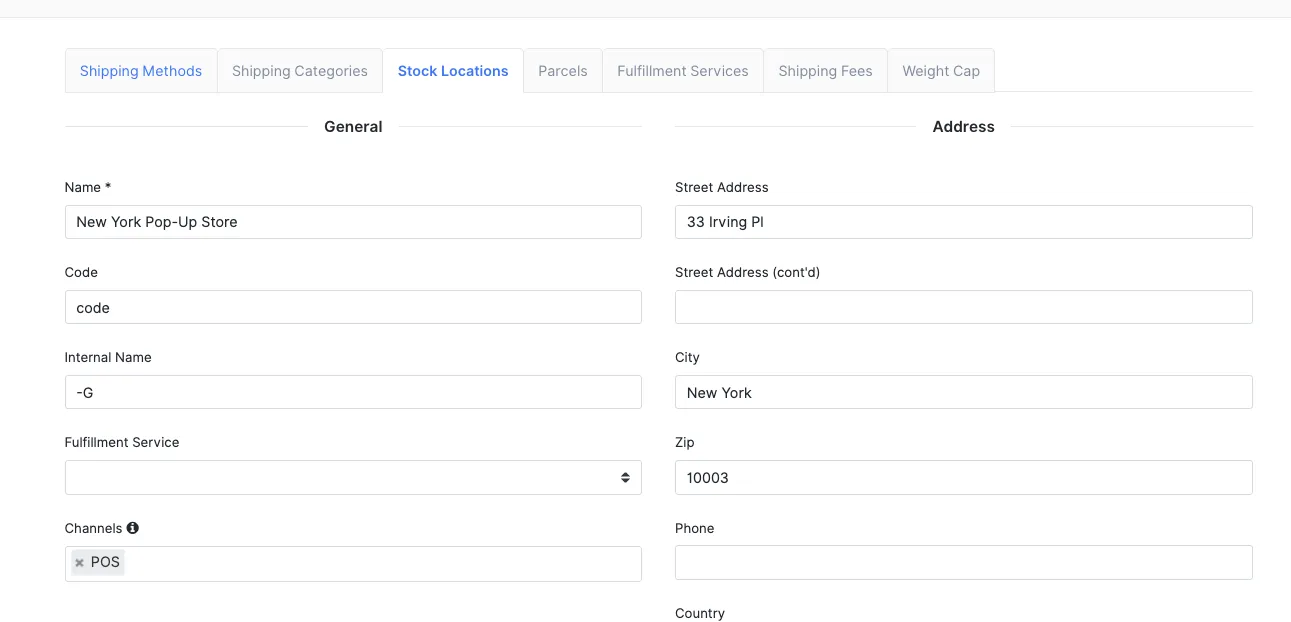
Leave Internal Name blank if that location's SKUs should be sent unchanged.
The suffix is literal — whatever you type in Internal Name is appended character-for-character, capitalization and dashes included. -G and G are not the same thing. Match exactly what RushOrder has in its catalog.
Verifying
Open Orders → Rush Order → Inventory and check that the suffixed SKUs (e.g. TSHIRT-BLK-L-G) appear in RushOrder's stock list. If they do, the suffix matches RushOrder's catalog and orders will pick correctly.
What else the order now sends
Alongside the SKU suffix, orders sent to RushOrder also carry:
PO Number — the OMS order number, so RushOrder's paperwork ties back to the order.
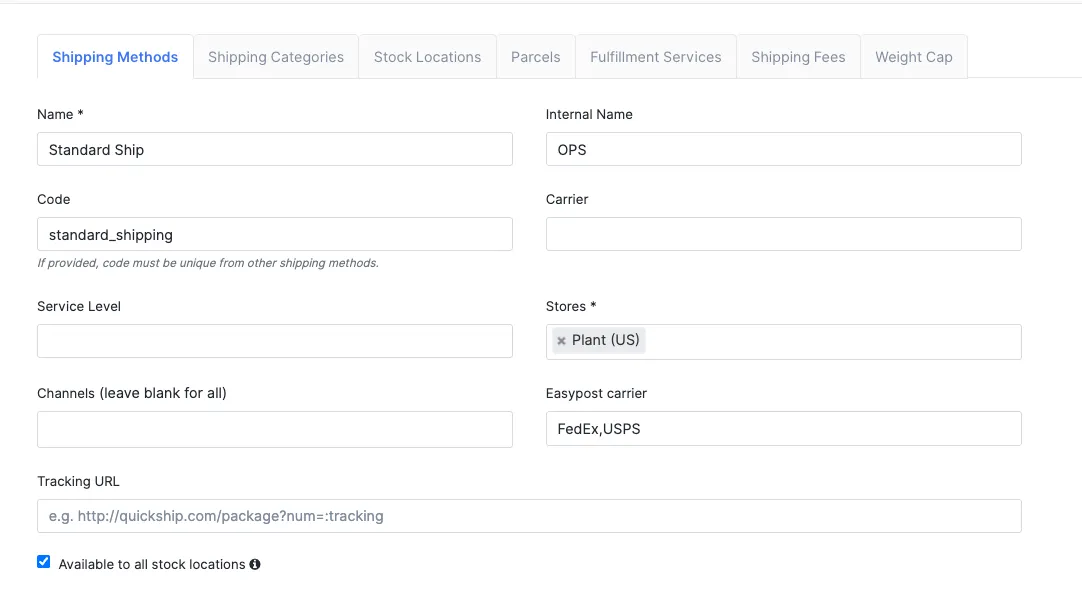
Ship Method code — the shipping method's internal name is sent as the ship method (falling back to the integration's Default Ship Method, then the shipping method's display name). Set each shipping method's internal name to the code RushOrder recognizes, e.g. GRM.
Custom Note — the order's special instructions are passed through to the warehouse.
Grouped line items — multiple units of the same product are sent as a single line with the summed quantity and extended price, instead of one row per unit.
Troubleshooting the suffix
"RushOrder rejected the order — bad SKU"
The SKU, with its suffix, must exist in RushOrder's catalog. Confirm the fulfilling stock location's Internal Name matches the suffix RushOrder expects, then check the suffixed SKU on the Inventory page. A blank Internal Name means no suffix is added, so if RushOrder expects one the plain SKU will fail.
The wrong SKU is being sent
The suffix comes from the stock location that's fulfilling the shipment, not the product. Check which stock location the shipment is routed to, then check that location's Internal Name in Settings → Stock Locations.
RushOrder rejected the order — unknown ship method
RushOrder only accepts ship method names it knows. Set the shipping method's internal name to the code RushOrder expects, or set a Default Ship Method in the integration settings as a fallback.