Iterable
Introduction
Iterable is a modern, AI-powered marketing automation solution that enables brands to craft highly personalized, real-time engagement strategies across multiple channels—all from one comprehensive platform. Its intelligent workflows, advanced analytics, seamless integrations, and recognized user experience make it a compelling choice for growth-minded marketers.
Getting started
Before connecting your Iterable account as a CDP destination, an API Key must be created within your Iterable account:
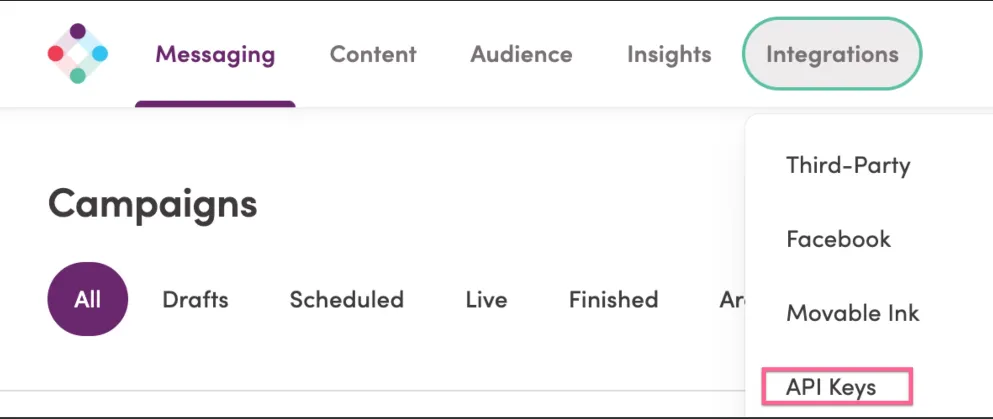
- Navigate to Integrations > API Keys within the top menu
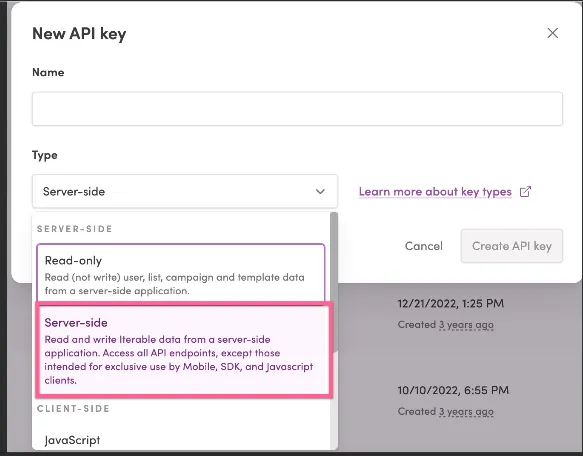
- Click on + New API Key
- In the New API Key modal, name the new key and select Server Side as the key type. Note: For Chord CDP purposes, the Server Side type is required, for more details on Iterable's types refer to Iterable's documentation here.
Connecting to the Iterable CDP destination
- Log into the Chord data platform.
- Navigate to the CDP.
- Click the "Add" button next to Destinations.
- Select Iterable from the destination catalog.
- Enter in the destination name and the Iterable API key.
- Click "Create" to connect.
Chord events relevant for destination
While Iterable serves as your SMS and email marketing platform, Chord passes through all availalbe/possible track events, page and identify events that are passed through any configured sources upstream. All track events are sent to the Iterable API with their original name as custom track events, while Chord identify events translate to user creation/updating
Chord Tracking Event | Destination Event/Action |
|---|---|
All Track Events | Event name passed as is |
Identify | Upsert Profile (to create or update user profile) |
Page | Page event sent as custom track event |
Before connecting destinations in the Chord CDP, please verify with all Destination owners that all non-Chord CDP configured destinations are disabled. Running external destinations alongside configured Chord CDP destinations can result in duplicate events downstream.