Messaging Events Data Modeling
This feature is currently in Beta. For access to this, please reach out to [email protected]!
Overview
This guide explains how Chord models messaging engagement data from Klaviyo and Iterable to support campaign analysis, audience segmentation, and activation. We highlight the most important attributes, event types, and how we enhance Klaviyo’s and Iterable’s native data with structure and long-term storage for smarter use across your customer journeys.
Both platforms are unified into a single set of models: the same Explores, the same attribution logic, the same metrics. Differences between platforms are called out where relevant.
Who this is for: Marketing and CRM teams using Klaviyo to power messaging campaigns and segmentation.
Core event attributes
Each Klaviyo event modeled in Chord includes the following key attributes:
- Event Date: When the action occurred—such as an email being opened, a message clicked, or an order placed.
- Session: Sessions help organize activity. A session starts when a user engages with a qualifying event (e.g., opens an email). We use this to model session-based metrics like order attribution or conversion analysis.
- Touch Type: Identifies the origin of the message:
Touch Type | Klaviyo | Iterable |
|---|---|---|
Campaign | One-time sends | One-time sends (blast, triggered) |
Flow / Workflow | Automated flow messages | Automated workflow messages |
NULL | External apps or non-Klaviyo sources | Events without a campaign or workflow |
Measures & metrics
We model multiple types of performance measures to support analysis:
- Event Counts: Total number of times an event occurred—e.g., how many emails were opened or links clicked.
- Unique Events: First-time actions for a user within a given campaign or flow. For example:
- Unique Opened Emails – used to start sessions
- Unique Click Rate – calculated as unique clicks divided by unique opens
- This is especially useful for building performance funnels across flows or campaign types.
- Revenue Attribution: For events like Placed Order (Klaviyo) or Purchase (Iterable), we capture revenue-related fields and associate them with the triggering session. This allows for clear connection between engagement and revenue outcomes.
- Supported channels by platform:
Channel | Klaviyo | Iterable |
|---|---|---|
Yes | Yes | |
SMS | Yes | No |
Push | Yes | Yes |
Attribution & session modeling
Chord’s Messaging Explore supports deeper insights with structured attribution windows and session rules.Both Klaviyo and Iterable use the same session-based last-touch attribution logic:
Attribution lookback windows
Channel | Lookback Period | Platforms |
|---|---|---|
120 hours (5 days) | Klaviyo, Iterable | |
Push | 120 hours (5 days) | Klaviyo, Iterable |
SMS | 24 hours | Klaviyo only |
Session-defining events
A new session begins when a user engages with one of these events:
Klaviyo | Iterable |
|---|---|
Opened Email | Email Open |
Clicked Email | Email Click |
Clicked SMS | (no SMS) |
Opened Push | Push Send |
Campaign enrichment
Field | Klaviyo | Iterable |
|---|---|---|
Campaign Name | Yes | Yes |
Campaign Status | Yes | Yes |
UTM Parameters | Yes (source, medium, campaign, term, content) | No |
Message Medium | No | Yes (email, push) |
Campaign Type | No | Yes (blast, triggered) |
Template Name | No | Yes |
Channel Name | No | Yes |
Message Type | No | Yes |
Target Lists | No | Yes (list names resolved) |
Suppression Lists | No | Yes (list names resolved) |
Workflow ID | No | Yes |
Send Size | No | Yes |
When the optional Campaign Mapping transform is enabled, both platforms are enriched with standardized campaign classification fields (region, brand, objective, category, etc.).
Where to find this data on Chord
Once your messaging events are ingested by Chord, you will be able to further analyze your messaging data on Chord. Follow the steps below to dig into your data:
- Log into the Chord Commerce data platform.
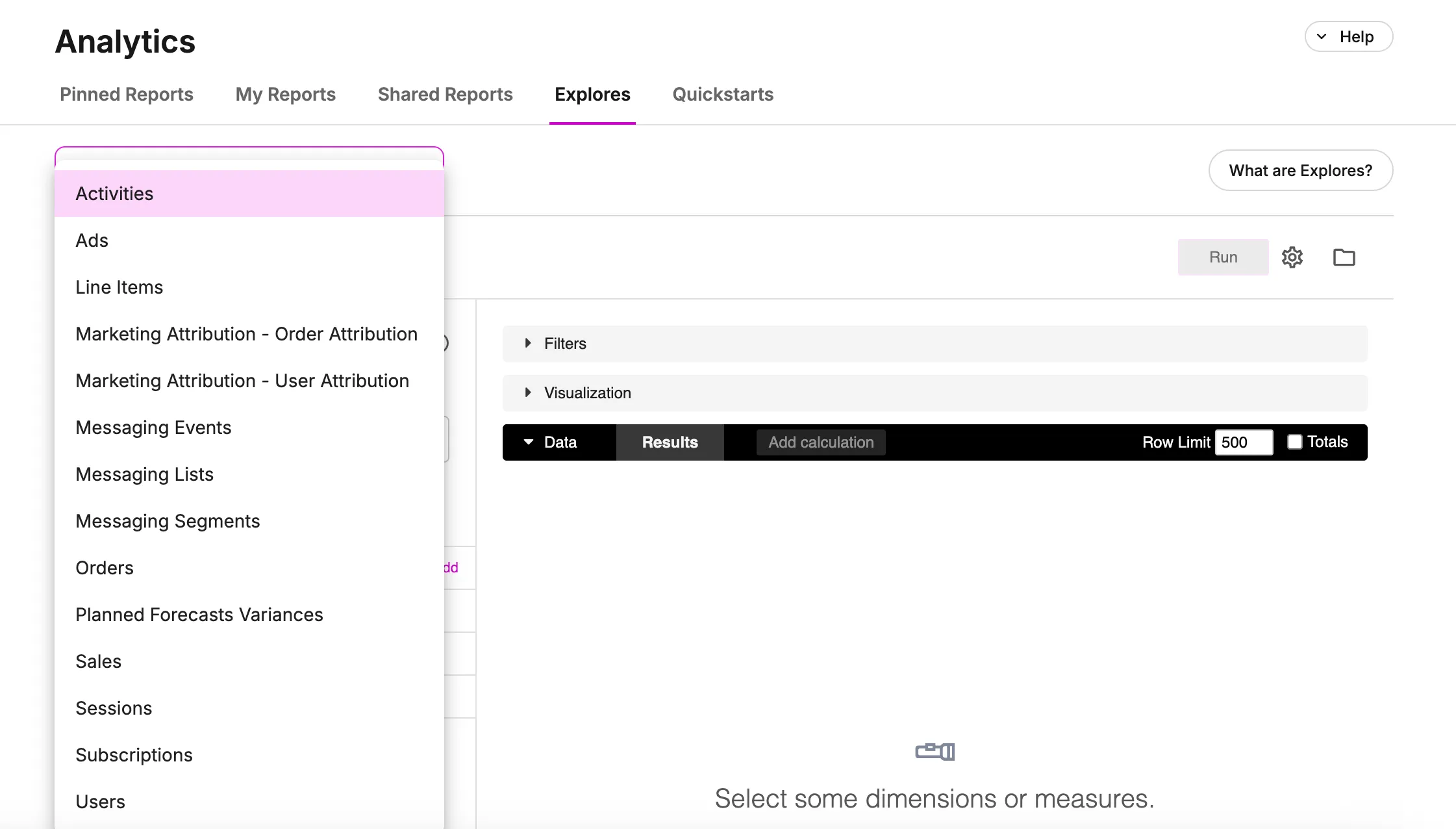
- Navigate to Explores tab on the Analytics page.
- Click on the Explores dropdown on the left side of the page.
- Select one of the following options based on what you’d like to analyze:
- Messaging Events: Use this Explore to create session funnels and analyze campaign or flow performance.
- Messaging Lists: Use this Explore to dive into active subscriber counts.
- Messaging Segments: Use this Explore to analyze behavior-based targeting in campaigns.
Filtering & interpretation tips
Note: Klaviyo campaigns don’t include a field that explicitly identifies the channel (e.g., Email vs. SMS). Campaigns rarely mix channels, so we recommend using event types and channel-specific metrics for precision.
- Use source_platform to filter for a specific platform or compare across platforms.
- Use campaign names to filter for one-time sends. If the campaign name is blank, the event likely came from a flow (Klaviyo) or workflow (Iterable).
- You can use Touch Type to distinguish flows/workflows from campaigns and external sources.
- Clicks and delivery outcomes are modeled separately by channel:
- Email and SMS clicks are tracked independently.
- Rates like click-through or bounce are also channel-specific.
- Push messaging metrics include bounce, send, and open.
Active subscriber modeling (Klaviyo only)
Chord enhances Klaviyo's list data by adding historical depth:
- List Membership: Klaviyo allows you to select lists when building a campaign, but doesn’t retain list membership counts over time.
- Chord Enhancement: We snapshot profile counts per list at regular intervals so you can:
- Track how many people were eligible for a campaign at send time; and
- Understand historic list size and growth trends.
Analysis not yet available: Identifying which users were members of specific lists for downstream activation.